Comparison3 min read
ShopFast vs Sellhub: features, payments and how to move your store
Short answer
Sellhub and ShopFast are both storefront platforms for digital goods where buyers pay through payment accounts you connect. ShopFast adds Fraud Shield on every checkout, product status pages, a Discord bot, a visual store editor and an import that moves a Sellhub store’s products, keys, customers and coupons with a dry run first.
On this page
Sellhub and ShopFast both run storefronts for digital goods, and on both the money goes to payment accounts you connect yourself. This comparison sticks to what each platform's own documentation shows as of October 2026. Where we could not confirm something on Sellhub's site, we left it out rather than guess.
| Feature | ShopFast | Sellhub |
|---|---|---|
| Payment providers you connect | Stripe, PayPal, Square, SumUp, Mollie, Razorpay, Paystack, Paddle, Authorize.Net, NMI, Shopify, Cash App, crypto to your own wallet, BTCPay Server and more | Stripe, PayPal (API, email or IPN), Square, Cash App and SumUp, plus payment plugins |
| Platform fee per sale on your own gateway | None | Not confirmed on Sellhub’s own site |
| Merchant of record option | ShopFast Pay, by application: ShopFast collects, remits sales tax and VAT and handles chargebacks | — |
| Storefront editing | Visual editor with sections, blocks and a live preview; built-in templates; AI store builder | Code editor: global layout, custom pages and page templates |
| Custom domain | Yes | Yes |
| Notifications | Email, Discord, Telegram and webhooks | Discord, Telegram and webhooks |
| Discord | Roles on purchase, removed on refund or when a membership ends; bot commands for buyers and staff | Discord notifications |
| Fraud tools | Fraud Shield: lists, rules, VPN and proxy checks, risk score, review queue | Blacklists |
| Product status pages | Built in, shown on product pages | — |
| Reselling | Store-to-store reselling and a wholesale portal | Reselling products |
| Embeds | Buy buttons, embeddable product cards and checkout | Embeds |
| Public API | REST API with OpenAPI, OAuth apps, signed webhooks and Lua plugins | Products, variants and stock, invoices, coupons, customers, blacklists, reviews, checkout sessions, team |
What does Sellhub offer?
Sellhub's documentation has setup guides for Stripe, PayPal (through PayPal's API, by email, or with IPN), Square, Cash App and SumUp, and for payment plugins. Stores can use a custom domain and embeds, and send notifications to Discord, Telegram and webhooks.
How a store looks is edited as code: Sellhub's code editor has a global layout, custom pages and templates for the home, product, checkout, payment, invoice, order, dashboard and reviews pages. There is a guide for reselling products, and an API for products and variants (including restocking and removing keys), invoices (completing, refunding, refunding to balance, replacing items), coupons, customers, blacklists, reviews, checkout sessions, audit logs and the team.
If you like editing templates as code and your payments already run through those providers, that is a capable setup.
What does ShopFast do differently?
- Payments on your own accounts, with no ShopFast fee per sale. Connect Stripe, PayPal, Square, SumUp, Mollie, Razorpay, Paystack, Paddle, Authorize.Net, NMI, Shopify, Cash App or crypto straight to your own wallet. Most of them open inside your checkout, so buyers never leave your store. See connecting your own gateway.
- Fraud Shield on every checkout. Blocklists, VPN and proxy checks, your own rules and a risk score decide every checkout before and after payment, with a review queue for held orders. See Fraud Shield.
- Status pages built in. Mark a product Live, Updating, Maintenance or Down, and the label shows on its product page and cards. Buyers can subscribe to changes.
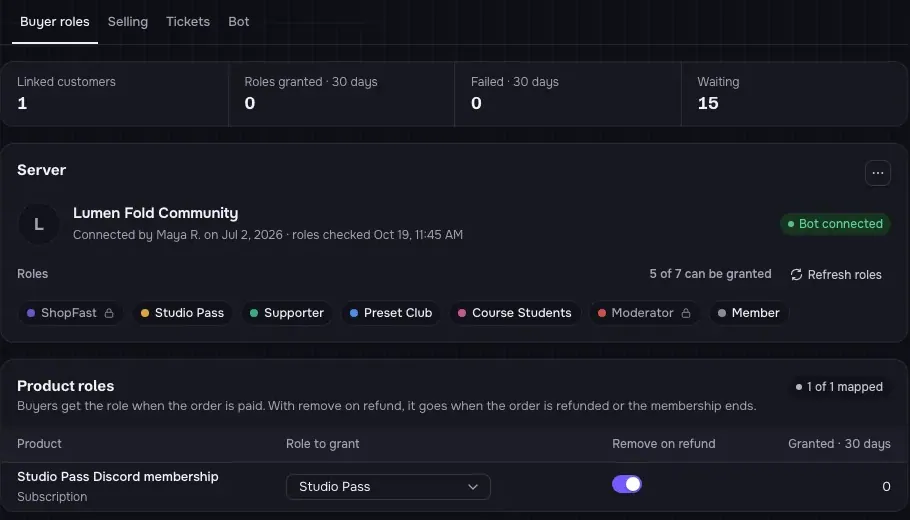
- Discord roles and a bot. Buyers get their role the moment they pay and lose it on a refund or when a membership ends. The bot adds /buy and /redeem for buyers and /lookup, /restock and /push-invoice for your team.
- A visual editor. Change your storefront with sections and blocks and a live preview instead of template code.
How do I move my Sellhub store to ShopFast?
Move a Sellhub store to ShopFast
- Export from Sellhub
Export your products, stock, customers, coupons and invoices from your Sellhub dashboard as CSV or JSON files.
- Open the import
In ShopFast, open Settings → Import → Switch platforms, pick Sellhub and drop in the files. Each file is recognized as products, keys, customers, coupons or orders.
- Check the columns
Open Columns on a file to change how its columns map to ShopFast fields. Key columns stay masked in the preview.
- Read the dry run
Run the dry run. It checks every row against your store and writes nothing, showing what will be created, skipped or needs a fix.
- Import
Start the import. Unsold keys go into each option’s pool, sealed on arrival; sold keys are skipped. If anything looks wrong, roll back the whole batch.
- Connect payments and tell buyers
Connect your own gateway in Money → Payments, connect Discord, and post an update to your buyers so they know where you moved.
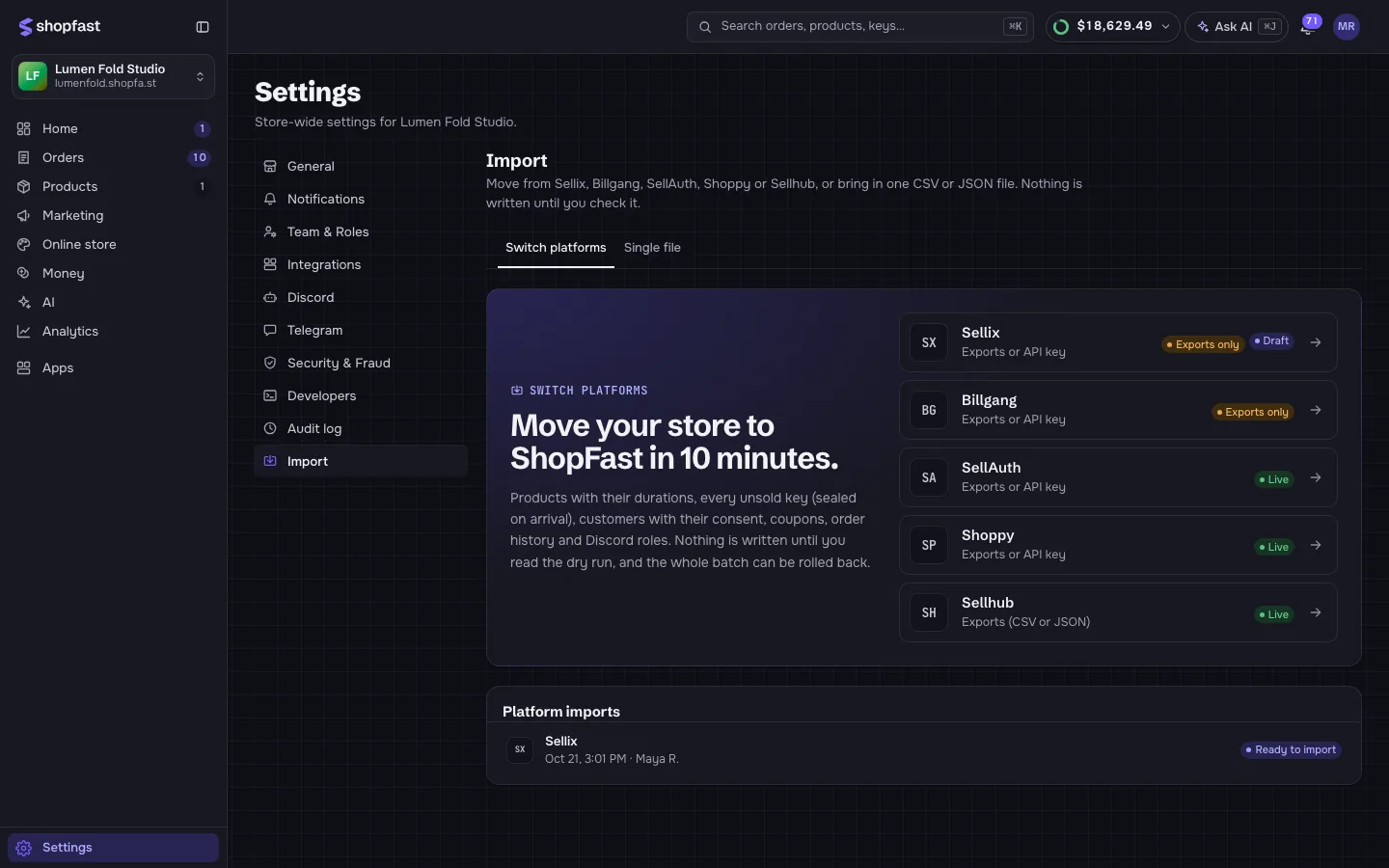
The switching guide lists every column the import understands and what happens to each kind of record.
Which one should you pick?
Stay on Sellhub if you are happy editing your store as code and the payment providers it documents cover your buyers. Move to ShopFast if you want fraud rules, status pages, a Discord bot and a visual editor in the same place, more ways for buyers to pay, and an import you can check before anything is written.
Questions people ask
Can I import my Sellhub keys into ShopFast?
Yes. Unsold keys from your Sellhub stock export go into the matching option’s key pool and are sealed on arrival. Sold or used keys are skipped, so nothing is handed out twice.
Will my order history come across?
Completed orders come across as history for your analytics and customer profiles. No money moves and nothing is delivered again.
Does ShopFast take a fee on each sale?
Not when buyers pay through your own gateway: only your provider’s fees apply and the money goes straight to you. ShopFast Pay, where ShopFast is the merchant of record, costs 15% plus $0.30 per order and 3% for processing, tax and chargebacks.
Do Discord roles carry over?
If your export has a Discord role per product, the import sets that product to grant the role after purchase. Connect your server in Settings → Discord.
Can I keep my custom domain?
Yes. Add the domain in ShopFast and point it at your store; your address on shopfa.st keeps working too.
Sources
Every fact about another platform comes from its own public pages. We checked them on October 26, 2026; plans and fees change, so confirm on each site before you decide.
- Sellhub documentation: guides and API reference docs.sellhub.cx
- Sellhub sellhub.cx